Free
$0
For getting started with invoicing, GST/HST tracking, bank statement import, and CRA deadlines.
Features
NorthBooks brings invoicing, expense tracking, GST/HST bookkeeping, tax preparation workflows, and reporting together in one practical workspace. It is built for freelancers, consultants, sole proprietors, incorporated businesses, and side businesses that need clear books without enterprise complexity.
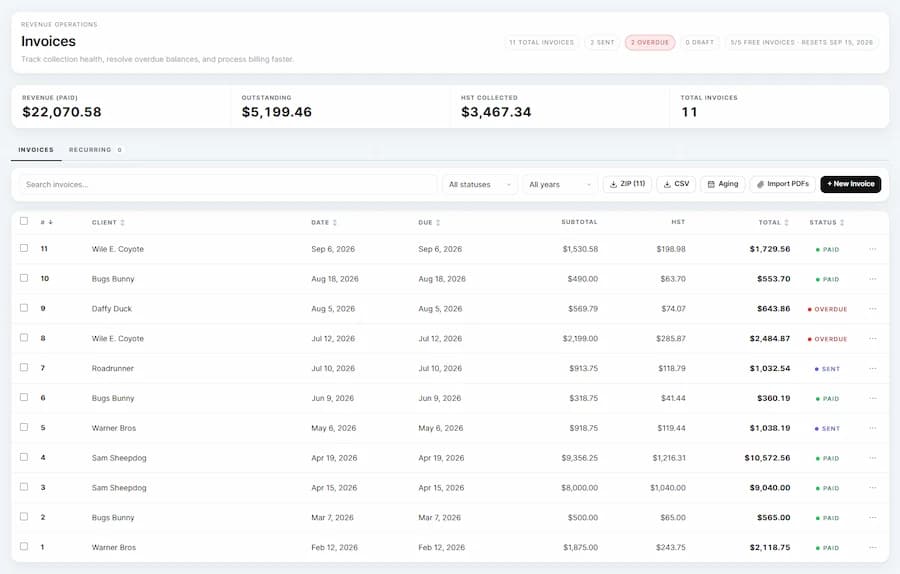
Invoicing & getting paid
Create branded invoices, apply GST/HST on line items, and send invoices directly from the app. NorthBooks helps you keep receivables organized with clear statuses like draft, sent, paid, overdue, and void, so you always know what needs follow-up.
You can also build recurring invoice templates and export PDF invoices when clients or accountants need records. For small business owners who want invoice software without bloated accounting suites, this keeps billing simple and consistent.
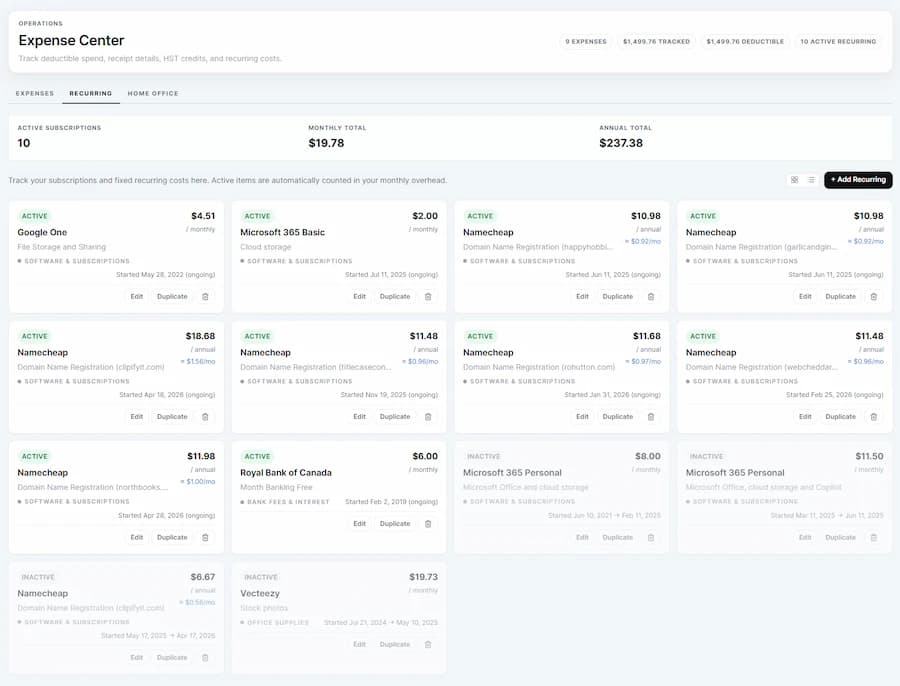
Expenses, receipts & transactions
Track business expenses, recurring costs, and business-use percentages in one place. Upload receipt images for manual expense records, and import PDF bank statements to extract transaction activity into clean, reviewable data.
NorthBooks can assist with extracting transaction and document data, but you still stay in control of review and final categorization. The result is practical bookkeeping software for small business workflows, not black-box automation.
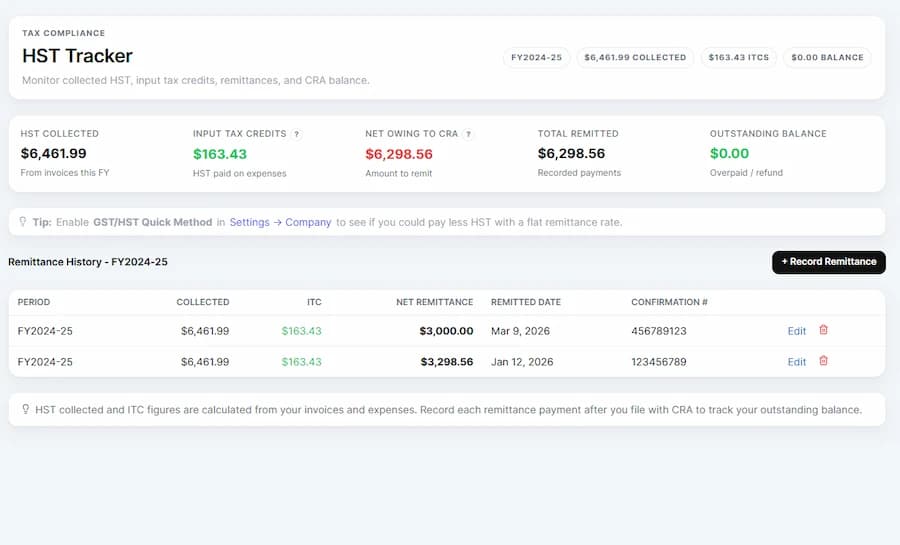
GST/HST & Canadian tax tracking
NorthBooks is Canadian bookkeeping software designed around GST/HST realities. It tracks tax collected, input tax credits (ITCs), and net remittance, then helps you record what was actually paid to CRA for each period.
For Pro users, Quick Method comparison is available to help estimate whether that approach could reduce remittance. NorthBooks also includes threshold and deadline context so GST/HST bookkeeping is visible throughout the year.
Tax preparation
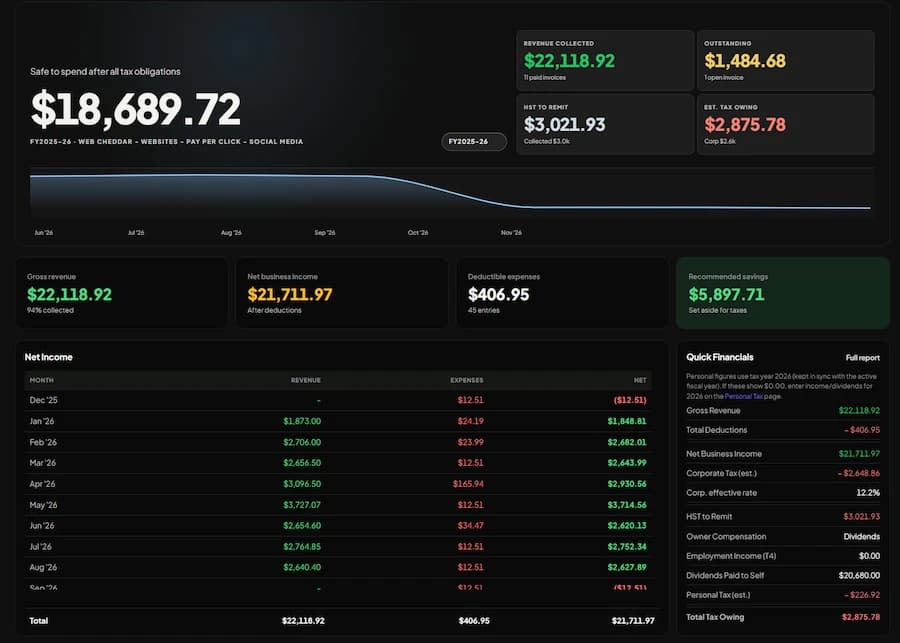
NorthBooks maintains running tax summaries as you keep your books current. Pro includes T2 corporate and T1 personal tax summaries, plus workflows for slips and year-end reporting so you can prepare clean data before filing.
It does not replace your accountant or claim to file everything automatically. Instead, it helps organize and export the information your tax software or accountant actually needs.
Payroll, mileage & deadlines
Beyond invoicing and expenses, NorthBooks covers day-to-day bookkeeping needs like payroll runs, mileage tracking, and CRA deadline visibility. That gives growing businesses one system for the work that usually gets split across spreadsheets.
Accountant collaboration
NorthBooks includes accountant access workflows so you can share read-only visibility and stop sending fragmented files back and forth. Your accountant can review records and exports faster, while you keep ownership of day-to-day bookkeeping.
Plans
$0
For getting started with invoicing, GST/HST tracking, bank statement import, and CRA deadlines.
$9/month
For running your business with unlimited invoices, tax prep workflows, payroll, mileage, and advanced exports.
$15/month
For businesses ready to connect. Planned integrations include Shopify, eBay, Stripe, Helcim, and Clover.
Coming soon| Feature | Free | Pro | Pro Plus |
|---|---|---|---|
| Invoices per month | 5 | Unlimited | Unlimited (planned) |
| GST/HST tracking + remittance history | Yes | Yes | Yes |
| Bank statement import | Yes | Yes | Yes |
| T2/T1 summaries + advanced exports | No | Yes | Yes |
| Payroll, T4/T4A workflows, mileage log | No | Yes | Yes |
| Platform integrations | No | No | Planned for Pro Plus |
NorthBooks is built around the way Canadian small businesses actually work: GST/HST bookkeeping, CRA deadline awareness, T-slips, tax-prep exports, and practical year-end workflows. It is designed to be affordable and understandable, whether you are a freelancer, sole proprietor, incorporated professional, or growing small business.
Data is hosted in Canadian infrastructure and the platform is designed to help you stay organized, collaborate with your accountant, and spend less time on admin.
Start free with NorthBooks and see how much easier bookkeeping can feel when the software is built for Canadian small businesses.